
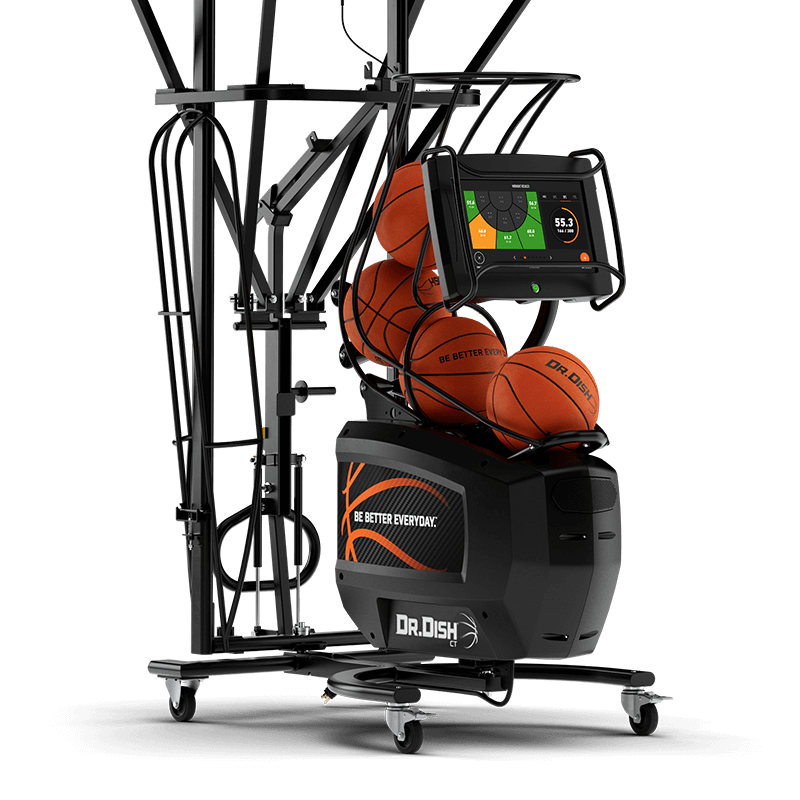


Εγκατάσταση της μηχανής Dr. Dish CT+

BHMA 1
Κατεβάστε την εφαρμογή Dr. Dish Player App & Δημιουργήστε τον δικό σας λογαριασμός
-
-
Εγγραφείτε εισάγοντας το όνομά σας, τη διεύθυνση email σας και τον προσωπικό σας κωδικό PIN. Αυτός ο λογαριασμός θα σας επιτρέψει να συνδεθείτε στην μηχανή Dr. Dish.
-
Η εφαρμογή σας επιτρέπει να να βλεπετε τα στατιστικά και τα ποσοστά σας. Για να διαχειριστείτε ή να δημιουργήσετε μια ομάδα, να δημιουργήσετε πίνακες
-
κατάταξης και να δημιουργήσετε ή να αναθέσετε προσαρμοσμένες ασκήσεις που
συγχρονίζονται απευθείας με το μηχάνημά σας, φροντίστε να χρησιμοποιήσετε την
-
- ηλεκτρονική μας Διαχείριση Εκπαίδευσης: tms.drdishbasketball.com
Having Issues Signing Up? Contact support@the-shot.gr
STEP 2
Unbox Your Dr. Dish Machine
- Lift the box off of pallet and machine by cutting the straps
- Cut off all white zip ties, (do NOT cut any black zip ties)
- Remove the shot counter from the back of the machine
- Remove protective plastic wrap from the entire machine
STEP 3
Assemble The Ball Feeder & Distance Adjuster
- Cut white zip ties off the Ball Feeder
- Remove cardboard spacer lowering Ball Feeder
- Install Ball Feeder by inserting 2 M8 Bolts & Washers
- Attach the Ball Distance Knob by twisting until tight, and move the Distance Lever to position 2
- Install the Ball Distance Plate using 4 M6 Screws & Washers
STEP 4
Remove Your Machine From the Pallet
- We recommend two adults remove the machine from the pallet
*The Dr. Dish weighs 296 lbs/134.3 kilos with all four wheels attached - Move the machine so the back wheels are off the pallet and resting on the ground
- Grab the front of the machine, twist it to the side and set the front of the machine on the ground
STEP 4
Assemble The Shot Counter
- Route the power cord from the shot counter basket through the shot counter handle until it comes out of the oval opening
- Insert Shot counter Head into Shot Counter Handle
- Using the 8 mm Allen Wrench & 17 mm Open Wrench included, bolt together the Shot Counter Basket and Shot Counter Handle
STEP 6
Set Up Your Dr. Dish for Use
When you’re ready to start shooting, with the machine away from the basket:
- Rotate the base of the Machine until at a 45-degree angle
- Extend all 4 netting poles until snapped into place, ensuring the net is not caught in frame
- Pull the netting handle outward and down to raise the net
- Once the handle is fully snapped into place, flip down the yellow safety latch to lock the net in position
- Insert the Shot Counter securely on the back frame of the Dr. Dish and tighten the knob and connect the power cord
- Wheel the machine directly under the basket until the rear poles are even with the backboard
- Once in place, lock the wheels of the machine
STEP 7
Power On & Connect to WiFi
- Using a type W 120V extension cord, connect the machine’s cord into an outlet
- Hold down the HUD Power Button for 5 Seconds until the screen turns on
- Click ‘Start Shooting’ in the bottom right corner of the Loading Screen to access the Home Screen.
- On the Left side, select the WiFi logo to connect to your Network
STEP 8
Getting to Know Your Dr. Dish
The Home Screen displays multiple ways you can use the machine to get started shooting. Check out some of our favorite features below:
- Build a Drill – Completely Customize your training by choosing shot locations, drill modes, & attributes to fit your training needs
- Multiplayer Mode – Train with multiple users at the same time while still saving each user’s individual stats
- Browse Training – View all the latest drills and workouts from some of the best NBA trainers and D1 Coaches
